

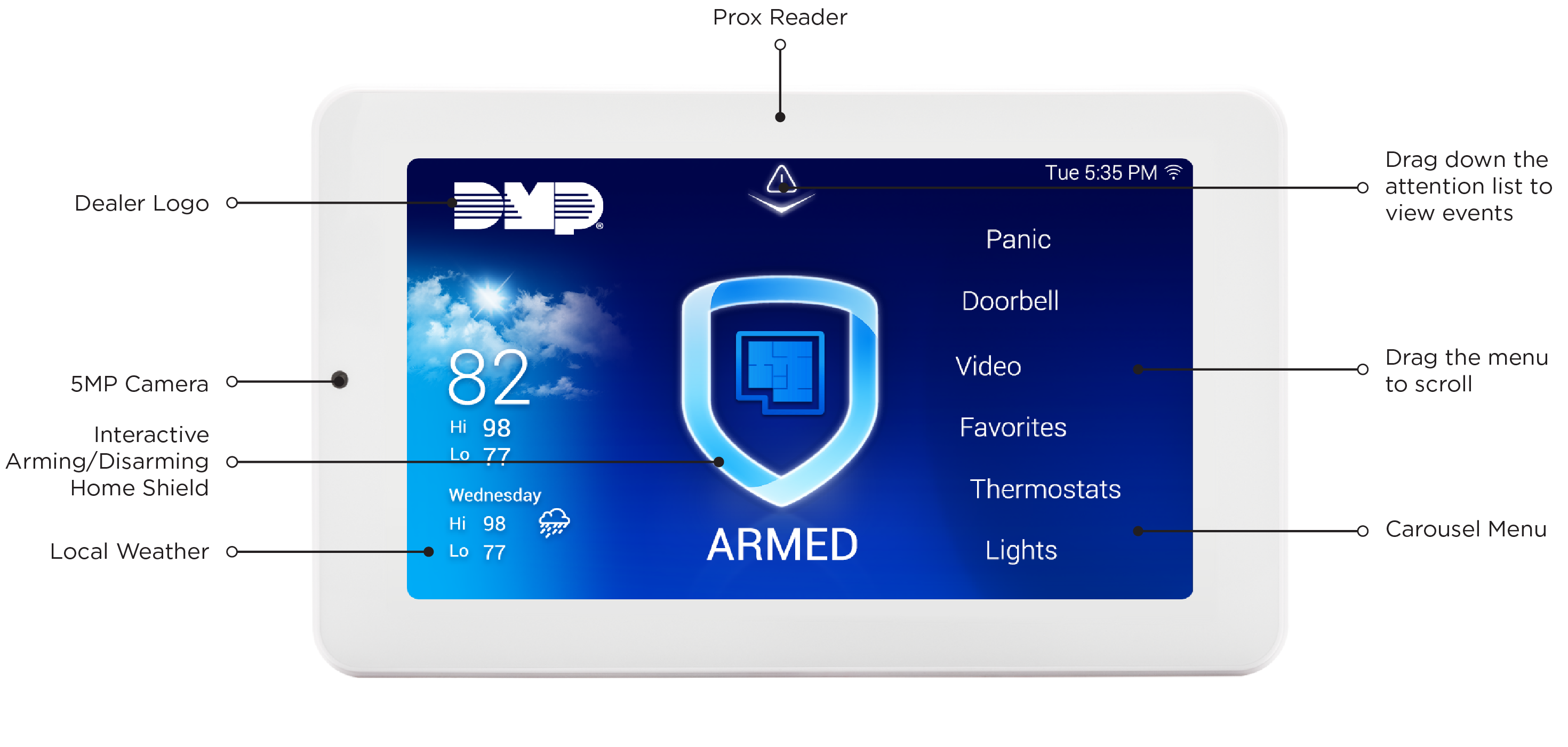
8863 7-Inch Touchscreen Keypads offer an easy-to-use touchscreen interface with an on-board 5MP camera, optional panic keys, an internal speaker, an on-board NFC/proximity card reader designed to read 125KHz proximity credentials, backup battery support, and other features.
Keypad Layout
Before You Get Started
Before installing an 8863 Keypad, determine how the keypad will communicate with the control panel and verify that you have everything needed for your installation. This section outlines the items included with the keypad, the tools you'll need, and the required and optional components for each installation method.
Not sure what to order?
Ordering Recommendations
Before purchasing an 8863 Keypad, consider the communication method, power source, and mounting method required for your installation. The following table identifies the items needed to meet your installation goals, along with available optional accessories. Refer to Ordering Information for additional details about each item.
Note: All 8863 keypads include a 4-wire harness for power and a mounting plate for mounting and are not required to be ordered separately.
|
Installation Type |
Items to Order |
|---|---|
|
An 8863 model keypad that
|
Optional:
|
|
An 8863 model keypad that
|
Optional:
|
|
An 8863 model keypad that
|
Optional:
|
|
An 8863 model keypad that
|
Optional:
|
|
An 8863 model keypad that
|
Optional:
|
|
An 8863 model keypad that
|
Optional:
|
|
An 8863 model keypad that
|
Purchase the parts separately
Buy it as a kit
Optional:
|
|
An 8863 model keypad that
|
Purchase the parts separately
Buy it as a kit
Optional:
|
|
An 8863 model keypad that
|
|
|
An 8863 model keypad that
|
|
|
An 8863 model keypad that
|
Purchase the parts separately
Buy it as a kit
|
|
An 8863 model keypad that
|
Purchase the parts separately
Buy it as a kit
|
|
An 8863 model keypad that
|
Optional:
|
|
An 8863 model keypad that
|
Optional:
|
|
An 8863 model keypad that
|
Optional:
|
|
An 8863 model keypad that
|
Purchase the parts separately
Buy it as a kit
Optional:
|
|
An 8863 model keypad that
|
Optional:
|
|
An 8863 model keypad that
|
Optional:
|
|
An 8863 model keypad that
|
Purchase the parts separately
Buy it as a kit
Optional:
|
|
An 8863 model keypad that
|
Purchase the parts separately
Buy it as a kit
Optional:
|
What’s Included
The following items are included with every 8863 Keypad. Additional components may be required depending on the installation method you choose.
-
One 8863 7-Inch Touchscreen Keypad
-
One Mounting Plate
-
Hardware pack
What You’ll Need
-
7/64” (2.5mm) drill bit for drywall mounting
-
1/4” (6 mm) drill bit for masonry mounting
-
#2 Phillips screwdriver
Choose Your Communication Method
The 8863 can communicate with the panel through Wi-Fi Network Connection, Power over Ethernet, Standard Ethernet, the Keypad Bus, or DMP Wireless. Select a communication method to get started.
Hardwired (PoE or Standard Ethernet)
To install and program using Power over Ethernet (PoE) or Standard Ethernet, begin here.