

8862 7-Inch Touchscreen Keypad Guide
Breadcrumbs

8862 7-Inch Touchscreen Keypad

8862 7-Inch Touchscreen Keypads offer an easy-to-use touchscreen interface with an on-board 5MP camera, optional panic keys, an internal speaker, an on-board NFC/proximity card reader designed to read 125KHz proximity credentials, and other features.

Keypad Layout
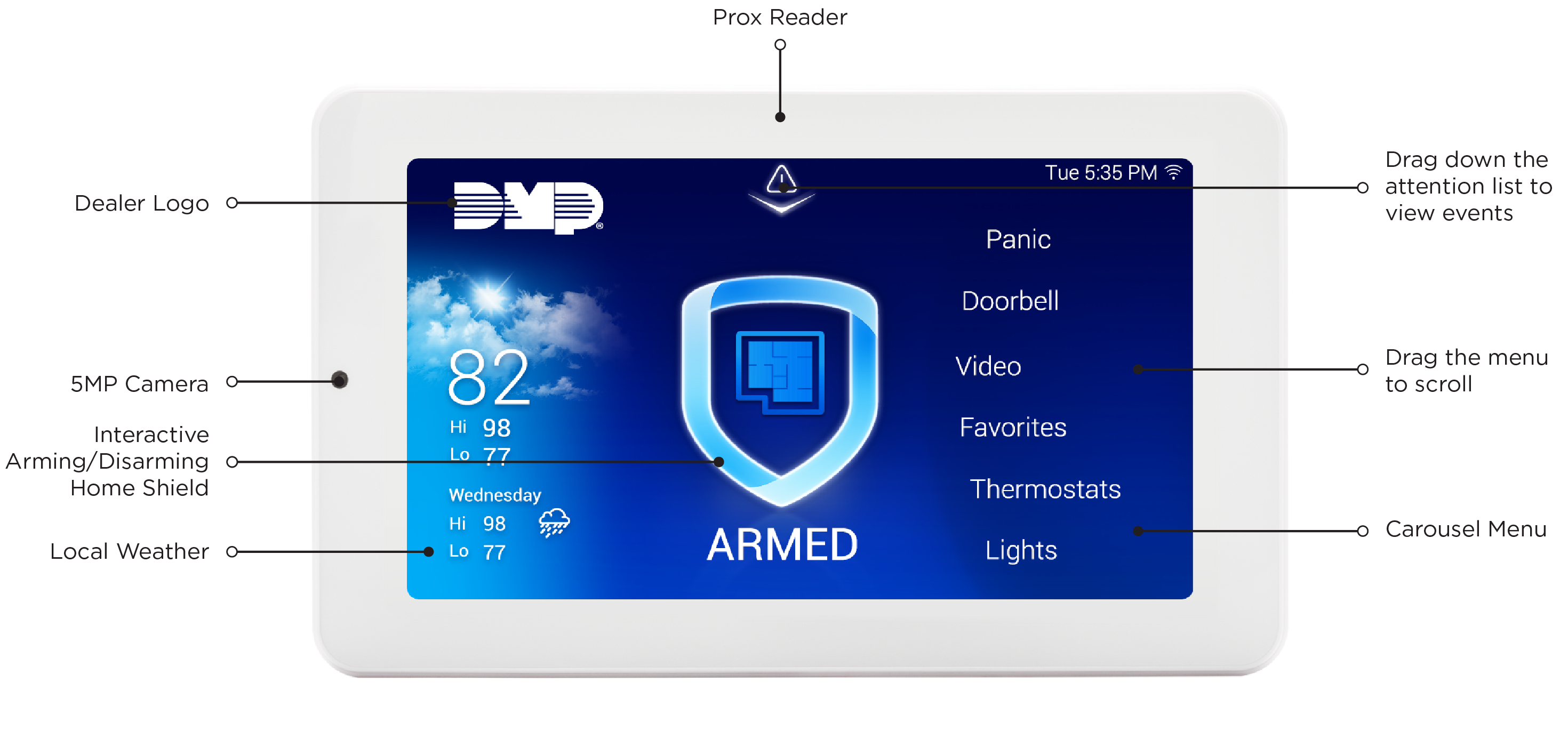
8862 Keypad Layout.png

Before You Get Started

Before installing an 8862 Keypad, determine how the keypad will communicate with the control panel and verify that you have everything needed for your installation. This section outlines the items included with the keypad, the tools you'll need, and the required and optional components for each installation method.

Not sure what to order?

Ordering Recommendations

Before purchasing an 8862 Keypad, consider the communication method, power source, and mounting method required for your installation. The following table identifies the items needed to meet your installation goals, along with available optional accessories. Refer to Ordering Information for additional details about each item.

Note: All 8862 keypads include a 4-wire harness for power and a mounting plate for mounting and are not required to be ordered separately.

Installation Type

Items to Order

An 8862 model keypad that

  • Communicates using the keypad bus

  • And mounts on the wall

  • One 8862 — 8862 7-Inch Touchscreen Keypad

Optional:

  • 300-8860-4 — Replacement 4-Wire Harness

An 8862 model keypad that

  • Communicates using the keypad bus

  • And sits on top of a flat surface

  • One 8862 — 8862 7-Inch Touchscreen Keypad

  • One 8860-STAND — Desk Stand Legs, White

Optional:

  • 300-8860-4 — Replacement 4-Wire Harness

An 8862 model keypad that

  • Communicates with the panel over Wi-Fi connection

  • And mounts on the wall

  • One 8862 — 8862 7-Inch Touchscreen Keypad

Optional:

  • 300-8860-4 — Replacement 4-Wire Harness

  • 300-8860-PWR-B — Replacement 2-Wire Harness, Black

  • 300-8860-PWR-W — Replacement 2-Wire Harness, White

  • 8860-PWR — 12V Power Supply with Harness

An 8862 model keypad that

  • Communicates with the panel over Wi-Fi connection

  • And sits on top of a flat surface

  • One 8862 — 8862 7-Inch Touchscreen Keypad

  • One 8860-STAND — Desk Stand Legs, White

Optional:

  • 300-8860-4 — Replacement 4-Wire Harness

  • 300-8860-PWR-B — Replacement 2-Wire Harness, Black

  • 300-8860-PWR-W — Replacement 2-Wire Harness, White

  • 8860-PWR — 12V Power Supply with Harness

What’s Included

The following items are included with every 8862 Keypad. Additional components may be required depending on the installation method you choose.

  • One 8862 7-Inch Touchscreen Keypad

  • One Mounting Plate

  • Hardware pack

What You’ll Need

  • 7/64” (2.5mm) drill bit for drywall mounting

  • 1/4” (6 mm) drill bit for masonry mounting

  • #2 Phillips screwdriver

Choose Your Communication Method

The 8862 can communicate with the panel through Wi-Fi Network Connection or the Keypad Bus. Select a communication method to get started.

Wi-Fi

To install and program using network communication, begin here.


Keypad Bus

To install and program using the keypad bus, begin here.